I have had my Late 2008 Aluminum Unibody MacBook for over 3.5 years now. I had not used my optical drive in quite some time, and went to watch a DVD today. The optical drive made a loud buzzing sound and seemed to vibrate more than usual. I opened the MacBook up and discovered that downward pressure on the optical drive made the problem worse, while wedging a screwdriver under the optical drive and applying pressure upwards made the noise disappear.
After the Aluminum Unibody MacBook’s introduction in Late 2008, Apple quickly changed the MacBook Pro lineup to the Aluminum Unibody design and all MacBook Pros from Mid 2009 through Mid 2012 have used a similar unibody design. This fix may also work for other MacBooks, MacBook Pros, or other Computers with slot-load Optical Drives. The fix does require disassembling the optical drive and will most likely void your warranty.
The fix is to disassemble the Optical Drive, bend the bottom aluminum cover of it outwards to relieve the pressure on the disc that causes the buzzing sound and vibration, and reassemble the Optical Drive. Here are pictures and instructions on how to do this:
Step 0. Open up your MacBook so that you can see all of the internals.
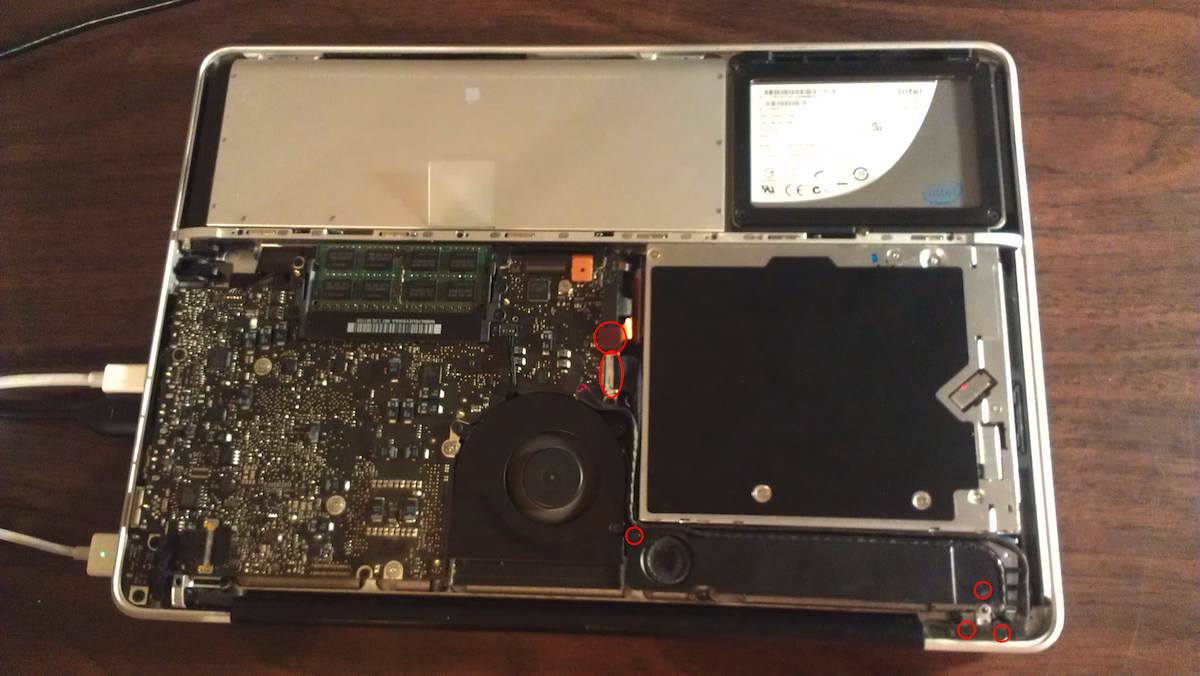
Step 1. Remove Connectors and Screws

Disconnect the Optical Drive connector and the Connector that covers the Optical Drive L-Bracket screw. Unscrew the speaker and the T-Shaped mount that covers the optical drive.